Includes the official OpenAI Codex package, complete Simplified Chinese resources, and automatic TokenCloud gateway configuration. No terminal or manual config editing required.
The OpenAI MSIX is neither modified nor re-signed, preserving official updates.
Automatic configuration
Gateway, provider, and authentication are configured for you.
Built-in Simplified Chinese resources
No separate language-pack download; Simplified Chinese is preselected through an official Codex setting.
Install guide
From download to first launch
The process usually takes only a few minutes. The installer preserves the original OpenAI MSIX signature and retrieves the real gateway address from Tokenav.
01
Prepare a TokenCloud API key
Register or sign in to TokenCloud, then create an active key on the API Keys page. Copy the complete key immediately after creation.
Large-file resume is supported. Run this file directly after downloading; no separate official package or language pack is required.
03
Paste the key and install
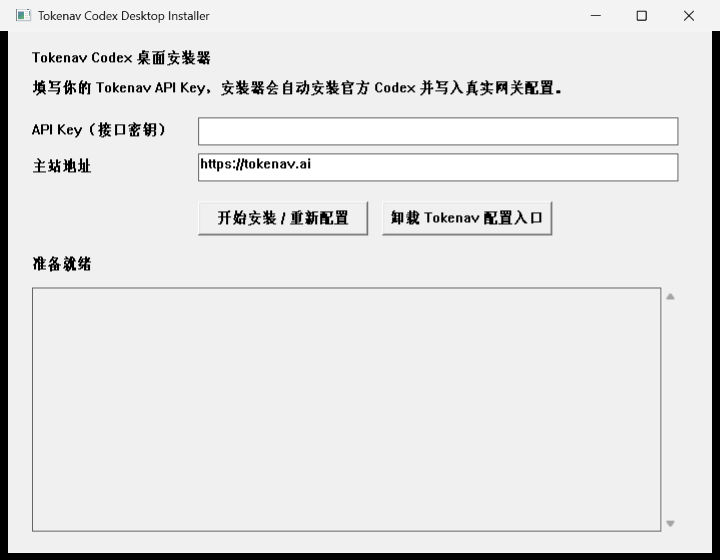
Run the installer, paste your full API key, keep the default control-plane address, and click “Install / Reconfigure”.
Real screenshot The actual first-run installer screen. No API key is present in this screenshot.
Paste the complete TokenCloud API key.
Keep the default control-plane address unchanged.
Click “Install / Reconfigure”.
Wait for the completed status; do not close the window during installation.
04
Reopen Codex
When the log reports completion, close the installer. If Codex is already open, fully quit and relaunch it so the new environment and settings take effect.
✓
Ready after installation
Close the installer and reopen Codex. The desktop shortcut and TokenCloud model-provider settings are already prepared.
FAQ
Frequently asked questions
Can I update an existing Codex installation? +
Yes. Running the installer again installs or updates official Codex and refreshes the real gateway configuration for your current API key.
Do Simplified Chinese resources require a separate download? +
No. The official package already includes the complete Simplified Chinese resources and the installer preselects Simplified Chinese. Loading the translated interface still depends on OpenAI’s official internationalization flag. If Settings shows Simplified Chinese while the product UI remains in English, the current account or network has not received that flag; reinstalling cannot bypass it.
What if Windows shows a security warning? +
Verify that the filename, SHA-256, and download origin match this site. The embedded official MSIX carries a valid OpenAI signature; the outer TokenCloud installer automates setup and configuration.
Do I need to reinstall Codex after changing my API key? +
No. Run the same installer again, paste the new key, and choose Install / Reconfigure.
Will removing TokenCloud configuration delete my Codex data? +
No. The uninstall action removes only the installer-created shortcut and environment variables. It does not delete Codex projects, conversations, or personal data.